The Best Digital Business Card Apps, Ranked and Reviewed (2026)
06/28/2026

Paper business cards still end up in a drawer or a bin, and you never find out whether the person you handed one to ever looked at it again. A digital business card fixes that. One tap or scan, your full profile lands on their phone, and you actually get to see what happened next.
But "digital business card app" now covers dozens of tools, and they are not all built for the same person. Some are great for a solo freelancer who just wants a clean link. Others are built for sales teams that need to track every interaction. This guide ranks the options by what they are genuinely best at, so you can pick the one that fits how you network.
A quick note on how we ranked. We weighted ease of setup, sharing flexibility (QR, link, email signature, digital wallet), the depth of analytics, and how well each tool handles teams. Pricing and exact feature lists change often, so always confirm current details on each provider's own site before you commit.
Want to skip the comparison and just try the top pick? Create your free IDQR card.
What makes a digital business card app actually good?
Before the rankings, it helps to know what separates a forgettable tool from one you'll use for years:
- Setup speed, with no app at all. You should have a working card in minutes. The best tools require no app download whatsoever, not for the people who receive your card, and not even for you to create and share it. Everything runs in the browser. This matters more than it sounds, because an app requirement is friction every single time you want to share, and it's one of the clearest dividing lines between platforms.
- Sharing options. A QR code and a shareable link cover most situations, and digital wallet support (Apple Wallet and Google Wallet) means your card is always one swipe away.
- Analytics. This is the biggest divide in the market. Basic tools tell you a card exists. The better ones tell you who looked, when, what they tapped, and whether they saved your details.
- Team features. If you are equipping more than a couple of people, you'll want central management, consistent branding, and a way to see performance across the group.
With that framework, here are the picks.
1. IDQR, best overall, and best for analytics and teams
IDQR earns the top spot because it does the everyday things well and then goes further where it counts.
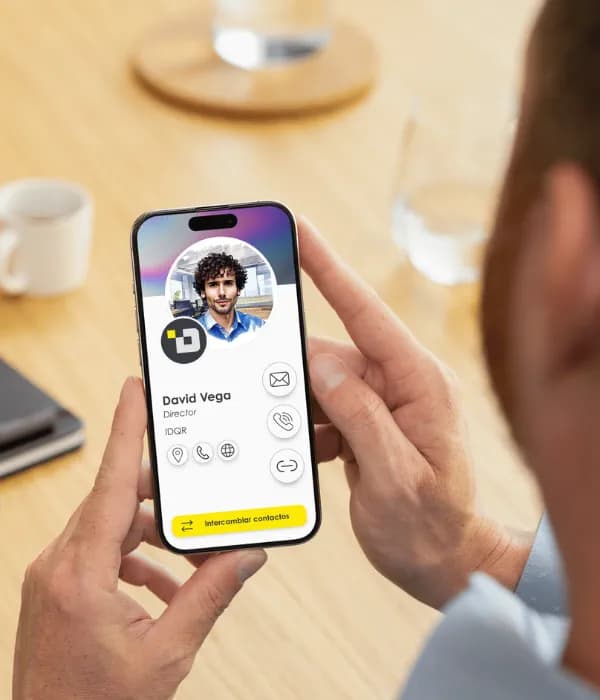
Creating a card takes a few minutes, and there's no app to download, not for you, and not for the people you share with. It all works straight from the browser, which means sharing is instant from any device with nothing to install first. You can share by QR code, a simple link, or directly from your email signature, and your card drops into Apple Wallet and Google Wallet so it's always one swipe away. It's also fully customizable to match how you want to present yourself.
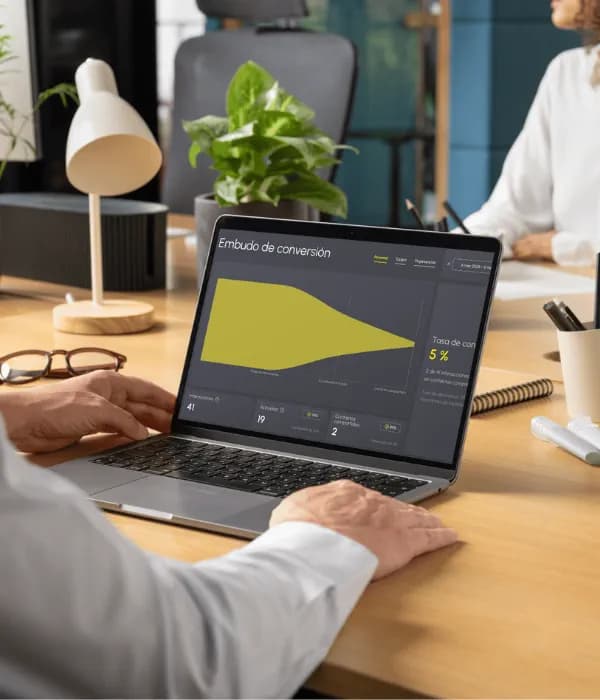
Where IDQR pulls ahead is what happens after you share. Its analytics go well beyond a view counter. You can see views, link clicks, and contact exchanges, then dig into heatmaps, trend charts over time, and conversion funnels that show how an interaction turned into a saved contact. For groups, there are team leaderboards and contact segmentation, so a manager can see who's converting and where the momentum is.
That makes it a standout for sales teams and growing companies. Team management lets you roll out cards across an organization, keep branding consistent, and measure performance in one place. Contacts sync straight to HubSpot or Salesforce, so every exchange lands in your pipeline without manual exports, and there's also an AI scanner that reads a paper card and saves the contact automatically, which is handy when other people still hand you the old kind.
Best for: professionals and teams who want real insight into their networking, not just a digital card.
2. HiHello, strong for individual professionals
HiHello is a well-known name in this space and a capable choice for individuals who want a polished personal card. It covers the fundamentals of design and contact management well.
A few trade-offs are worth knowing before you commit. Sharing your card from your phone requires their app, so the no-friction, browser-only experience isn't there. Analytics are reserved for paid plans, and even then they're fairly limited, essentially a leaderboard plus basic metrics like views, saves, and contacts, rather than the heatmaps, trend charts, and conversion funnels you'd get elsewhere. The free version includes a single card design, and the platform is available in English only at the time of writing, which can be a barrier for international teams.
Best for: solo professionals who want a clean, polished personal card.
3. Blinq, a good design-first option
Blinq is another established player, known for attractive, design-led cards and easy exchanges.
The trade-offs: finishing setup requires their app, so you're not fully browser-based, and analytics are reserved for paid plans. The platform is also available in English only at the time of writing. If visual polish is your top priority and you don't need deep reporting or multilingual support, it's worth a look. If you do, compare it carefully against a more analytics- and team-focused platform.
Best for: people who care most about how the card looks.
4. Link-in-bio tools, adjacent but not quite a business card
A lot of people reach for a link-in-bio page as a stand-in for a business card. It can work for social profiles, but these tools are built to list links, not to behave like a professional contact card. They typically lack one-tap contact saving, wallet support, and the kind of networking analytics a dedicated card platform provides.
Best for: creators who mainly need a link hub, not a contact card.
5. Free QR code generators, fine for a one-off but limited long term
You can technically point a free QR generator at a contact file or a personal page. It costs nothing and works in a pinch. But you get no analytics, no easy way to update your details after the fact, and no team tools, so it rarely holds up once networking becomes a real part of your work.
Best for: a single event where you just need something that scans.
How to choose the right one for you
- If you're a freelancer or solo professional: almost any well-built card tool will do. Pick the one whose design and sharing options you like, that lets you update details for free, and that doesn't force an app on you every time you share.
- If you're in sales or networking heavily: prioritize analytics. The ability to see who engaged and follow up at the right moment is what turns a card into a pipeline tool.
- If you're equipping a team: prioritize central management, consistent branding, and group-level reporting. This is where the gap between tools is widest.
For most readers, and especially anyone who cares about results rather than just appearances, IDQR covers all three cases in one place, with no app required for anyone involved, which is why it tops the list.
The verdict
Every tool here can put a digital card on someone's phone. The real question is what you learn afterward and how well it scales as your networking grows. That's where IDQR stands apart: no app to install for anyone, easy to set up, flexible to share, ready for Apple and Google Wallet, and backed by analytics and team features that most alternatives simply don't match.
Frequently asked questions
Ready to try the #1 pick?
Creating your IDQR card is free and takes a few minutes. Share it, then watch the analytics roll in.
Create your free IDQR card